
Slime video
Slime Video Generator
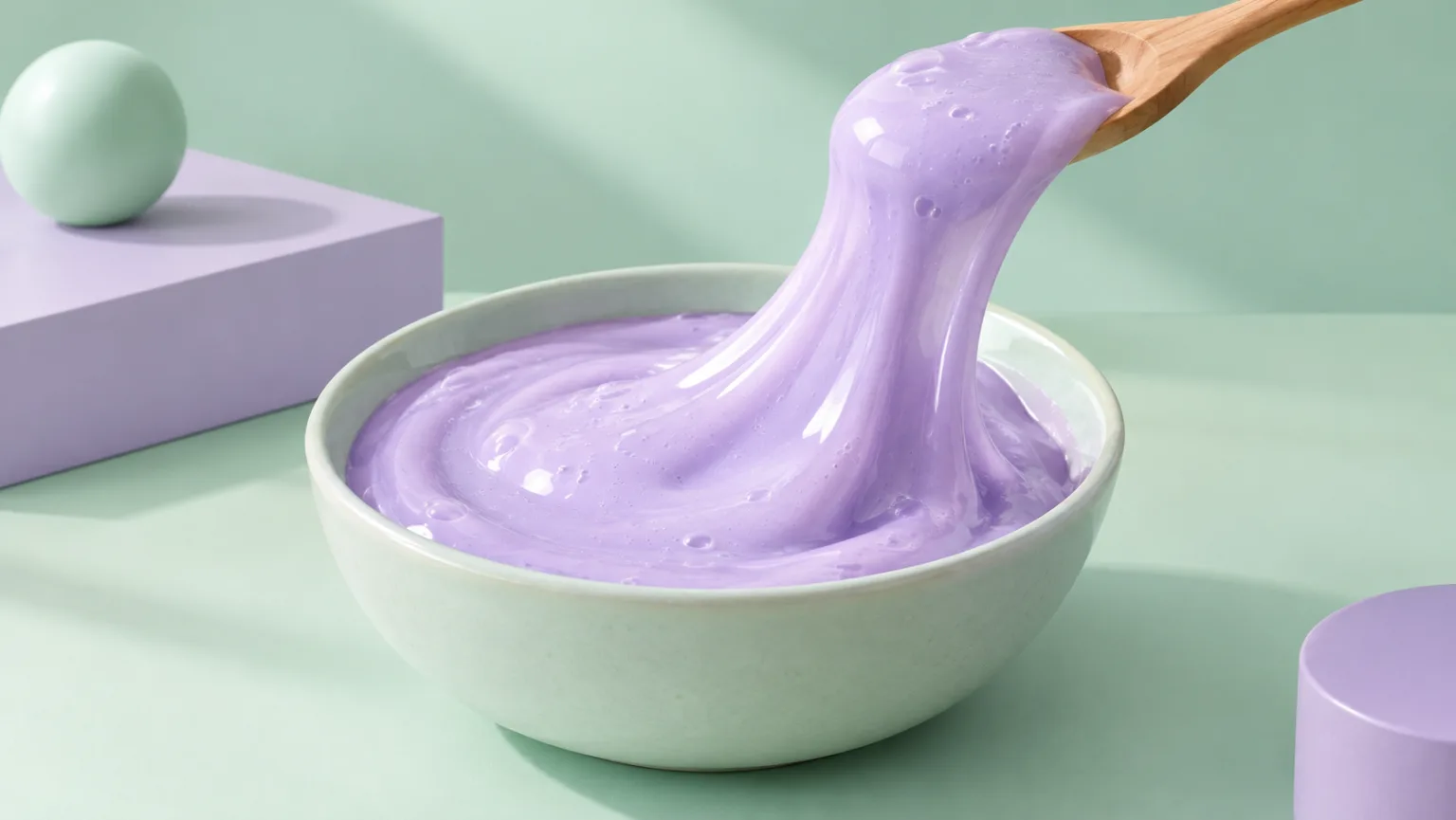
Create glossy slime videos that show the stretch, the fold and the bubble instead of hiding them. Start with a prompt or a still image, then generate a short clip with a clean background and a readable motion path.
Slime video
Try this workflow in the workspace
Your starter prompt is already loaded. Change the texture, motion or framing, then generate with the model that fits the result you want.
ai.video.generator.credits_cost
ai.video.generator.form.advanced
ai.video.generator.form.workflow_runtime_hint
ai.video.generator.form.fast_hint
ai.video.generator.form.generate_audio_hint
ai.video.generator.no_results
Slime stretch starter prompt
A glossy pastel slime stretched slowly from a ceramic bowl with a clean studio background.
Glossy pastel purple slime lifted from a ceramic bowl with a wooden spoon, long smooth stretch, satin sheen and small bubbles, mint studio background, soft directional light, slow motion, no text, no logos, no watermark.
The three slime shots that always work
Most strong slime clips use one of three shots: a slow stretch, a fold-and-press, or a color mix. The stretch shows elasticity and gloss. The fold-and-press shows density and the return of the surface. The mix shows two colors combining without turning into a muddy average.
Choose one shot per generation. If you want a longer video, generate each shot separately and edit them together. A single prompt that asks for a stretch, a mix and a pour usually produces a compromised version of all three.
- Stretch: show the strand thinning and the surface catching light.
- Fold: show the material stacking and settling.
- Mix: keep two colors distinct long enough to read.
Make the gloss readable
Gloss is a lighting problem more than a material problem. A broad soft light creates a clean highlight; a hard light creates small sparkles; a dark background makes a translucent slime glow. Decide which highlight you want before you describe the color.
Too many reflections can make the surface look like plastic or glass. If the slime should feel wet and stretchy, describe a satin sheen rather than a mirror finish. A slight texture in the highlight helps the material read as soft.
- Use a broad softbox for a clean sheen.
- Use backlight for translucency.
- Avoid mirror-like reflections that read as hard plastic.
Control the color mix
Color mixing is appealing because the change is easy to see, but it is also easy for the model to turn two colors into a flat blend. Keep the palette to two colors and describe how they meet: a slow fold, a spiral, a pour, or a press that traps one color inside the other.
If the mix is the main event, use a plain background and a fixed camera. If the mix is a secondary detail, keep it at the edge of the frame so it does not compete with the stretch. The viewer should know where to look.
- Use two colors, not four.
- Describe the meeting point of the colors.
- Keep the background plain when color is the payoff.
Keep the stretch physically believable
Slime stretches because it is cohesive. The strand should thin gradually, and the part attached to the tool or hand should stay connected. If the strand breaks too early, the clip loses the payoff. If it never thins, the material looks like rubber.
Describe the speed of the pull and the point where the strand is thickest. A slow pull with a visible thinning point is easier to control than a fast snap. For a loop, return the strand to the bowl or end on a clean break with a settled surface.
- Describe a gradual thinning point.
- Keep the strand connected to its source.
- Choose a clean break or a return-to-bowl ending.
Check the details that break the illusion
Look for bubbles that appear and disappear, a tool that changes shape, or a strand that passes through itself. These are common in generated slime clips because the model is interpolating a complex soft body. A shorter clip with one clear action is easier to keep consistent.
If the clip is for a product, compare the color and finish with the real slime. Do not use a synthetic clip to imply a texture or stretch that the product does not have. Keep the creative asset and the product documentation separate.
- Watch for bubbles and self-intersections.
- Check the tool shape across frames.
- Keep synthetic visuals separate from product claims.
Model and provider notes
Image workflows use the configured KIE model catalog, including GPT Image 2, Nano Banana 2, Seedream, FLUX and Qwen where available. Video workflows use the configured Seedance provider chain, with fallback routing to KIE, WaveSpeed, SeeAPI, fal or Replicate where enabled. Model availability, resolution, duration and credit cost depend on the workflow you select.
AI output varies between runs. Check hands, reflections, text, anatomy and motion before publishing, and label synthetic media where your platform requires it.
Questions creators ask
Related ASMR workflows
Pick the next workflow that matches the texture, motion or subject you want to create.
Squishy ASMR Generator
Create squishy ASMR videos built around touch, sound and a slow reveal. Use the workspace to shape a close-up, control the compression and keep the visual rhythm calm enough to loop.
Satisfying Video Generator
Generate oddly satisfying videos built around a clean action, a readable texture and a loop that invites another watch. Start with a prompt or a still image and keep the frame focused on the moment that pays off.
AI ASMR Video Generator
Turn a text prompt or a still image into a short, satisfying ASMR clip. Squishy ASMR gives you a working video workspace, starter prompts and separate workflows for squishy, slime, sand, soap and food textures.
ASMR Image Generator
Generate calm, tactile ASMR images for covers, thumbnails, channel art and product previews. Start from text or edit an existing still, then keep the palette and texture consistent with your video workflow.
Show the stretch, not just the color
Load the slime recipe, generate a short pull and check the thinning point before you add a second color.
Published by Squishy ASMR · Last updated 2026-10-22